See where the orders are resting before price gets there.
PrimeScope draws the Binance order book as a heatmap behind your candles, with the live Depth of Market ladder, CVD and Order Flow Bubbles on the same chart as your structure and wave tools.
- No card needed
- Heatmap free on BTCUSD
- Runs in the browser
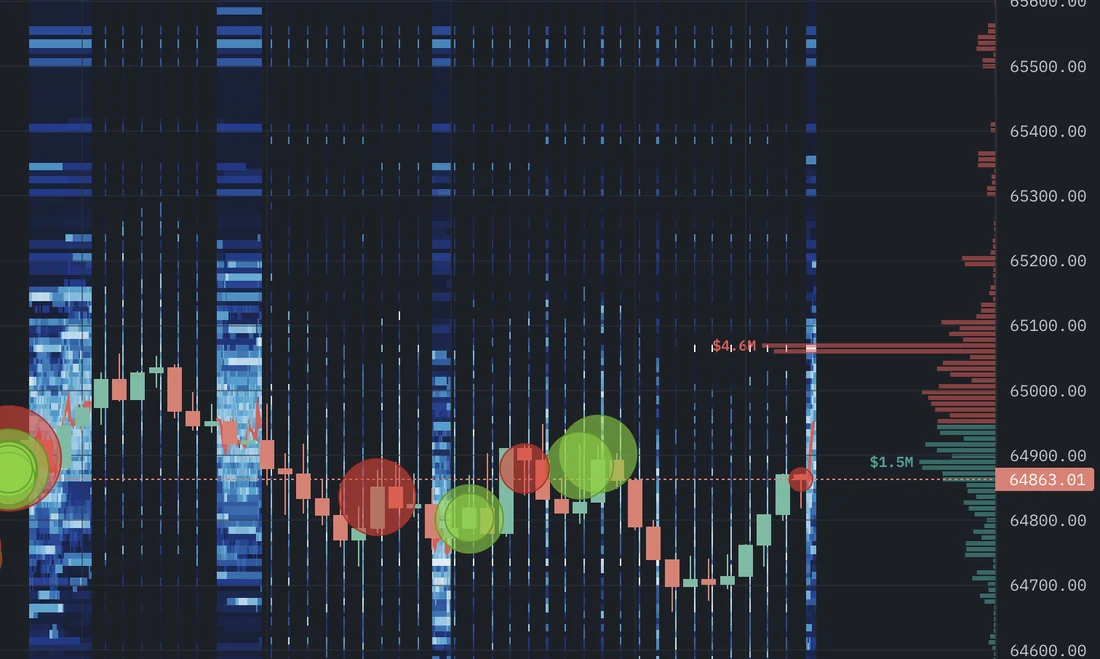
A candle shows where price went. The book shows what it ran into.
Limit orders wait in the book, and most charts never show them. The heatmap shades each price level by the size resting there and draws it through time behind the candles, so you can watch a level build, hold, or get pulled before price arrives.
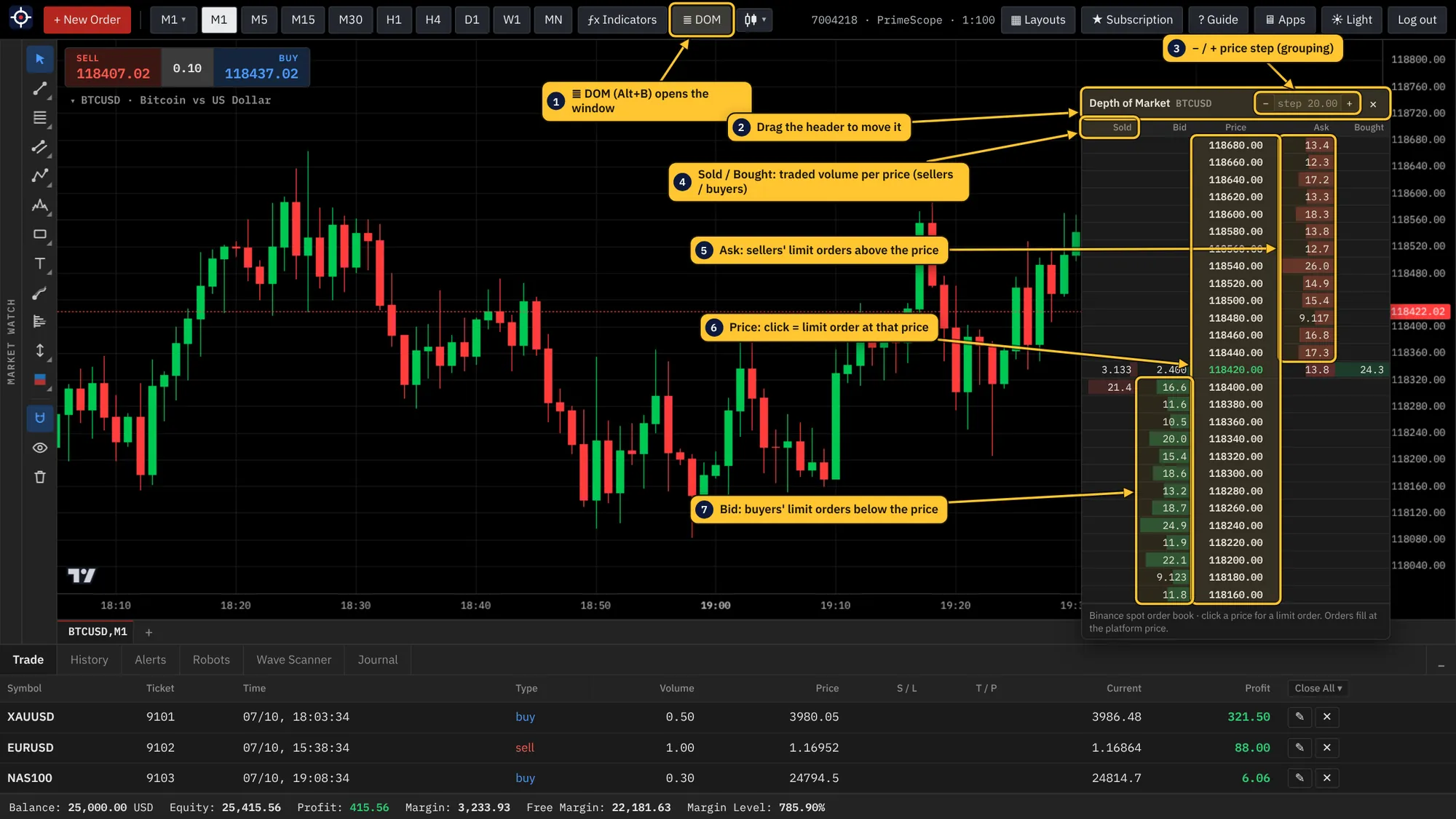
- Depth of Market: the live ladder of bids and asks, with traded volume per price
- Order Flow Bubbles: large market orders, buyers green, sellers red
- CVD: cumulative volume delta, live
- Market
- Crypto, Binance spot
- Also for BTC and ETH
- Perpetuals and liquidations
- Free without a plan
- Heatmap and DOM on BTCUSD
- Around it
- 136 indicators, 60 drawing tools
How the layers read together
A simplified sketch with made-up data. Watch price reach a thick band and either stall or eat through it, and toggle the layers to see what each one adds.
Four order-flow layers on one chart.
Switch each one on or off. They sit on the same chart as everything else you use.
The rest of the plan comes with it.
There are no add-on packs. One plan covers the order-flow layers and every other Pro Tool, across 84 instruments.
From sign-up to a readable book in three moves.
Open a trial
Name and email, and your login arrives by email. Seven days, every tool, no card. Once per person.
Start free trialPull up a crypto pair
Open BTCUSD and pick the Liquidity heatmap quick setup. It switches on the heatmap, large trades and CVD together.
Practise before you size up
Training replays real history with the future hidden and grades each plan with a Discipline Score from 0 to 100.
How training works
We tested our own scoring and published what we found.
Including the unflattering part: the Total Score's lean was right about half the time, like a coin flip. A heatmap is the same kind of tool. It shows the book more clearly. It does not say what happens next, and orders can be pulled at any moment.
Read our own testOne plan. Everything on this page is in it.
14-day trial
Every tool unlocked, once per person
- Heatmap, Depth of Market, Bubbles and CVD on crypto
- All Pro Tools and Training
- Nothing is charged when it ends; your layouts and drawings stay
PrimeScope
Cancel anytime from your plan page
- Order-flow layers on crypto
- All structure, wave and context tools
- 84 instruments, alerts, saved layouts
Card via Stripe, or USDT (TRC20) / USDC (ERC20) for 30 or 365 days per payment, with no auto-renewal.
Sales tax or VAT may apply. A partner code takes 20% off your first paid month.
Before you sign up.
Does the heatmap cover futures, forex or stocks?
No. The heatmap, Depth of Market and Order Flow Bubbles run on crypto, where the full order book is public. Forex, metals, energy, US stocks and ETFs are on the platform for charting and the rest of the Pro Tools.
Is any of it free?
Yes. The heatmap and Depth of Market work on BTCUSD without a subscription. Other crypto pairs are part of the plan.
Can a heatmap tell me where price will go?
No. Orders can be added or pulled at any moment. It shows where size is sitting now, which is context and not a forecast.
Can I place trades from PrimeScope?
No. PrimeScope is for analysis only. It holds no money and sends no orders to a broker or exchange.
Do I need to install anything?
No. It runs in any modern browser. If you prefer an app, there are downloads for desktop and mobile.
Why does the heatmap start partway across the chart?
It is drawn from the live order book, so it builds from the moment the chart is open. Candles from before that have no book behind them.
Is the animated sketch real data?
No. The screenshots on this page are the real product. The animated sketch is a simulation drawn in your browser to show how the layers read together.
Look at the book for a week, then decide.
Seven days, every tool, no card.
Questions first? Write to support@primescope.app.